One central memory for you and all your AIs
What used to be impossible now exists: tasks, notes, skills and prompts in one safe place, with smart search, that Claude, ChatGPT and your agents use and enrich, always under your control.
No card · Sign in with Google · 3 months free
Reinvent the way you work and organize
Three utilities in one place, working on the same information.
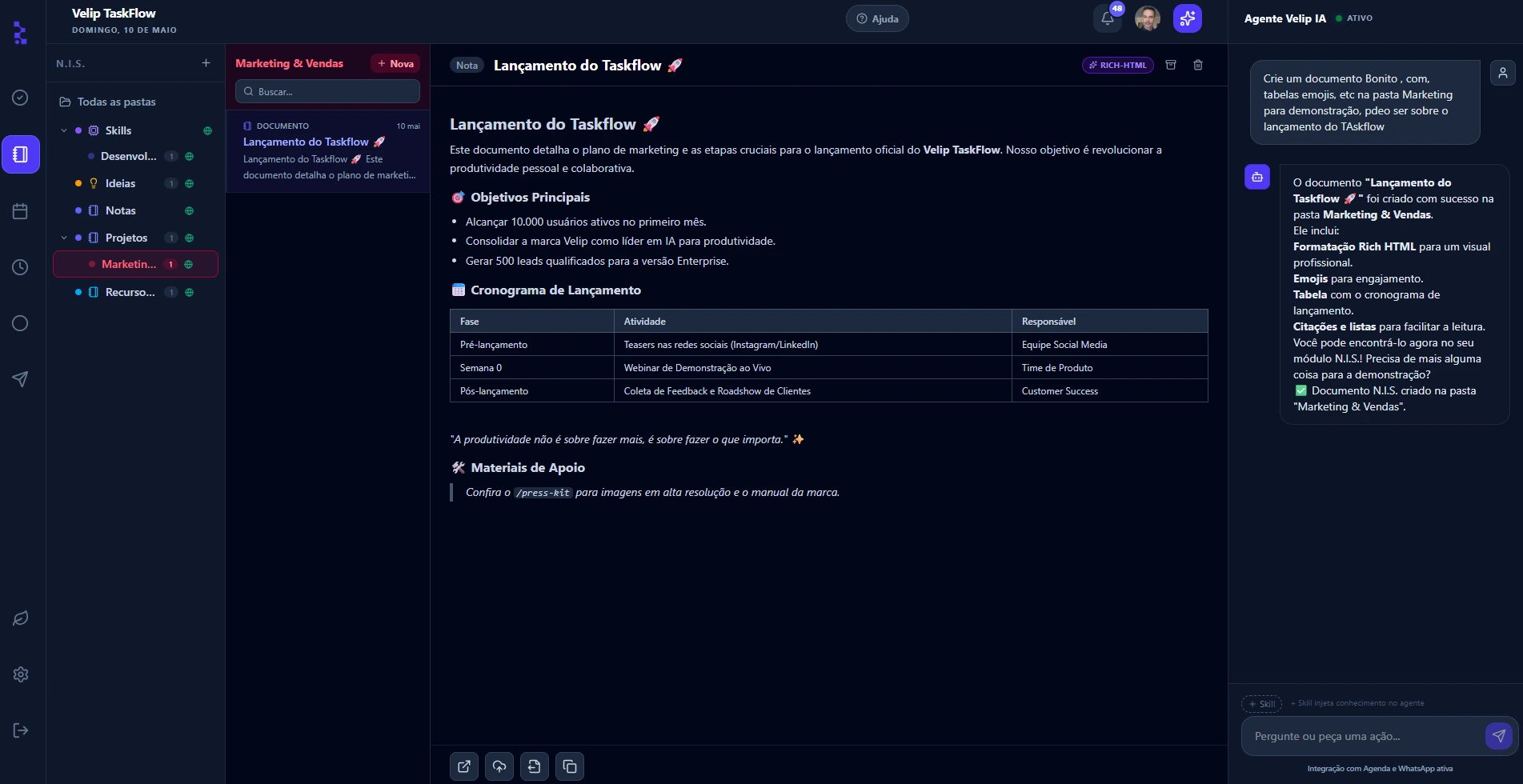
To-Do
Task organizer
A board with Today, Upcoming and Initiatives: tasks and subtasks with assignees, due dates and alerts.
See detailsMemories
Notes, Ideas and Skills & Prompts
Your knowledge base with smart search: what you know, stored and always accessible.
See detailsAI Orchestrator
Connects everything and every AI
It works across all your information and talks to the external AIs: Claude, ChatGPT, Gemini and Cursor.
See detailsYour task organizer, with real AI
Three columns for real life (Today, Upcoming and Initiatives), with you and your agents operating the same board.
A place to keep what you know, and make any AI more useful
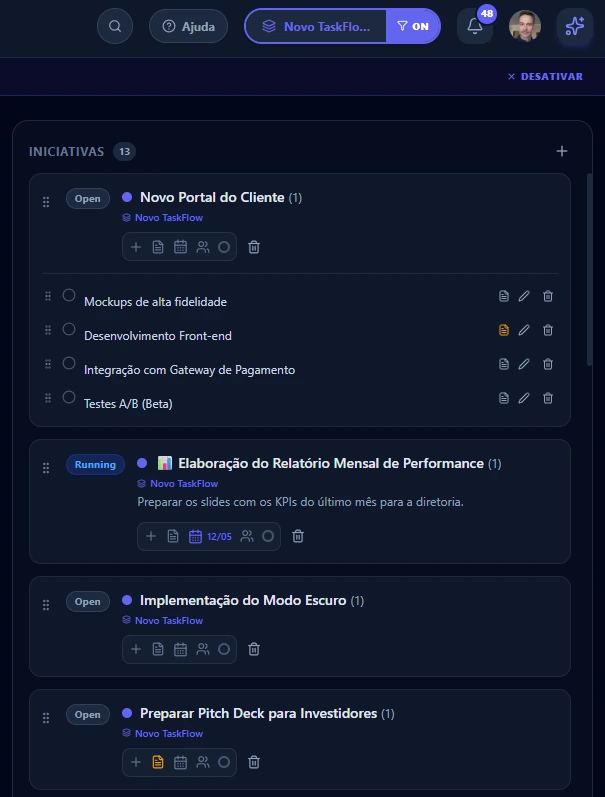
We call it N.I.S.: Notes, Ideas & Skills. Structured knowledge that agents consume, update and remember, with semantic search by meaning.
Notes, Ideas & Memories
Notes
Documents with rich formatting
Paste from any AI (ChatGPT, Gemini or Claude) and the content arrives whole: tables, code and lists preserved.
Ideas
Quick capture of insights
What has not yet become a process, but needs to stay accessible to you and to the agents.
Memories
What must not be forgotten
Decisions, preferences, learnings and the context of each project. You find it later, and so do your agents, when they have permission.
Skills & Prompts
Skills
Playbooks that agents execute
Markdown instructions that agents follow. Say "run skill X" and any agent executes the team's process. Import from GitHub in one click: a file, a folder or a whole repo, with a provenance badge.
Prompts
Templates ready to use
Prompts saved as shortcuts, available in the built-in chat and right in Claude's add menu.
Your working memory should not end with the conversation.
TaskFlow keeps decisions, preferences, learnings and the context of each project in one safe, always accessible place, so you and any authorized agent can pick up right where you left off.
The AI that orchestrates your information
It works across your tasks, notes and memories, and talks to the external AIs you already use.
Built in
Velip AI, the native copilot
Sees your screens, understands the context and acts from the side panel. Creates cards, edits notes, searches by meaning and injects skills without you leaving the screen.
- Creates, moves and edits tasks by text command
- Semantic search: finds by meaning, not just keyword
- Persistent memory across sessions
- AI messages included every day, on every plan
Connected
Your favorite agent, connected
Connect Claude, ChatGPT, Gemini or Cursor with one click of Google authorization. It starts reading and updating your tasks, notes and memories with you.
- Works with any compatible agent (open MCP standard)
- You control what each agent sees and can revoke access anytime
How the MCP connection works
- MCP: an open, industry-standard protocol
- OAuth 2.0 for Claude and ChatGPT, no token to copy
- Bearer token for IDEs (Cursor, Windsurf and others)
- Full audit of every agent action
- Workspace boundaries respected automatically
- Tiered skills: the agent loads only what it needs and saves context
Orchestration
You plan. The agents execute. TaskFlow keeps everything in place.
It's not TaskFlow or Claude. It's TaskFlow for Claude, ChatGPT, Gemini or Cursor. The edge shows up when you use more than one agent at the same time: each on a task, all reading and writing to the same source of truth, with no conflict.
Velip TaskFlow
The layer that organizes
External agent
The one that executes the work
Velip TaskFlow
The memory and organization layer
Claude
Writes the campaign copy
ChatGPT
Analyzes the backlog and prioritizes
Gemini
Finds references for the brief
+ any other MCP-compatible agent, in parallel
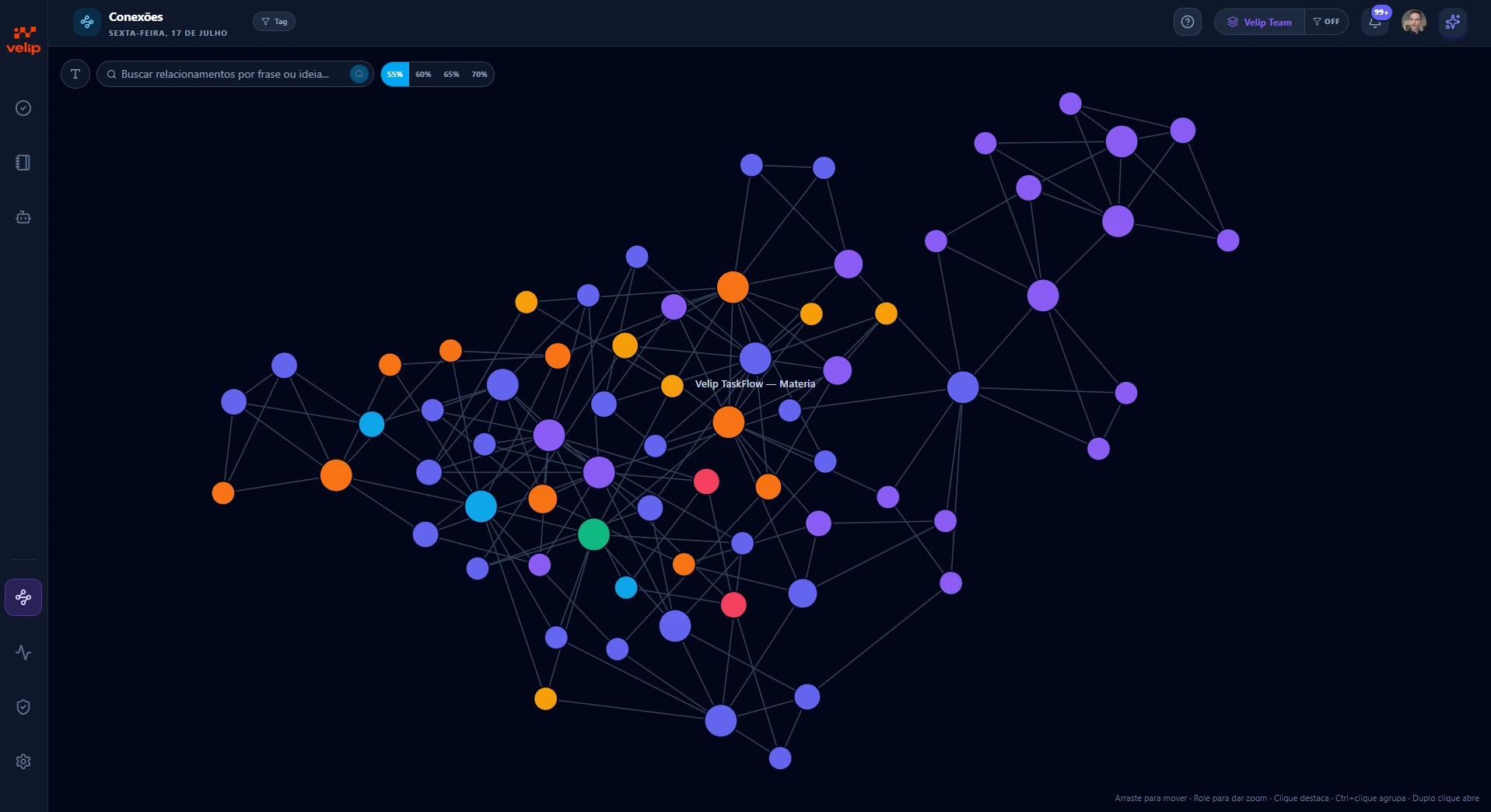
Connections Map
Discover what your notes have to do with each other
Every document gets an automatic semantic index. TaskFlow reveals relationships by meaning, with nothing for you to configure.
"I know I already wrote about this, but I can't find it." The map exists to retire that sentence.
Interactive graph
Each node is a document in its folder's color; lines connect content that is similar in meaning. Drag, zoom, click to highlight neighbors. Double-click opens the document.
Search by phrase
Type an idea into the search and it becomes a node connected to the 10 closest documents by meaning, even without keywords in common.
Group analysis
Ctrl+click two or more nodes: Similar mode shows what resembles the set; Bridges mode, what connects different topics.
Related while you write
Below the editor, the documents closest to the open item: 2, 10 or 30 connections. Click a chip to open it, even from another area.
Whiteboard
The canvas that becomes a task, a document, and AI execution
Mind maps, processes and architectures on an ultra-fast vector canvas, connected to the rest of your work, not locked in a separate tool.
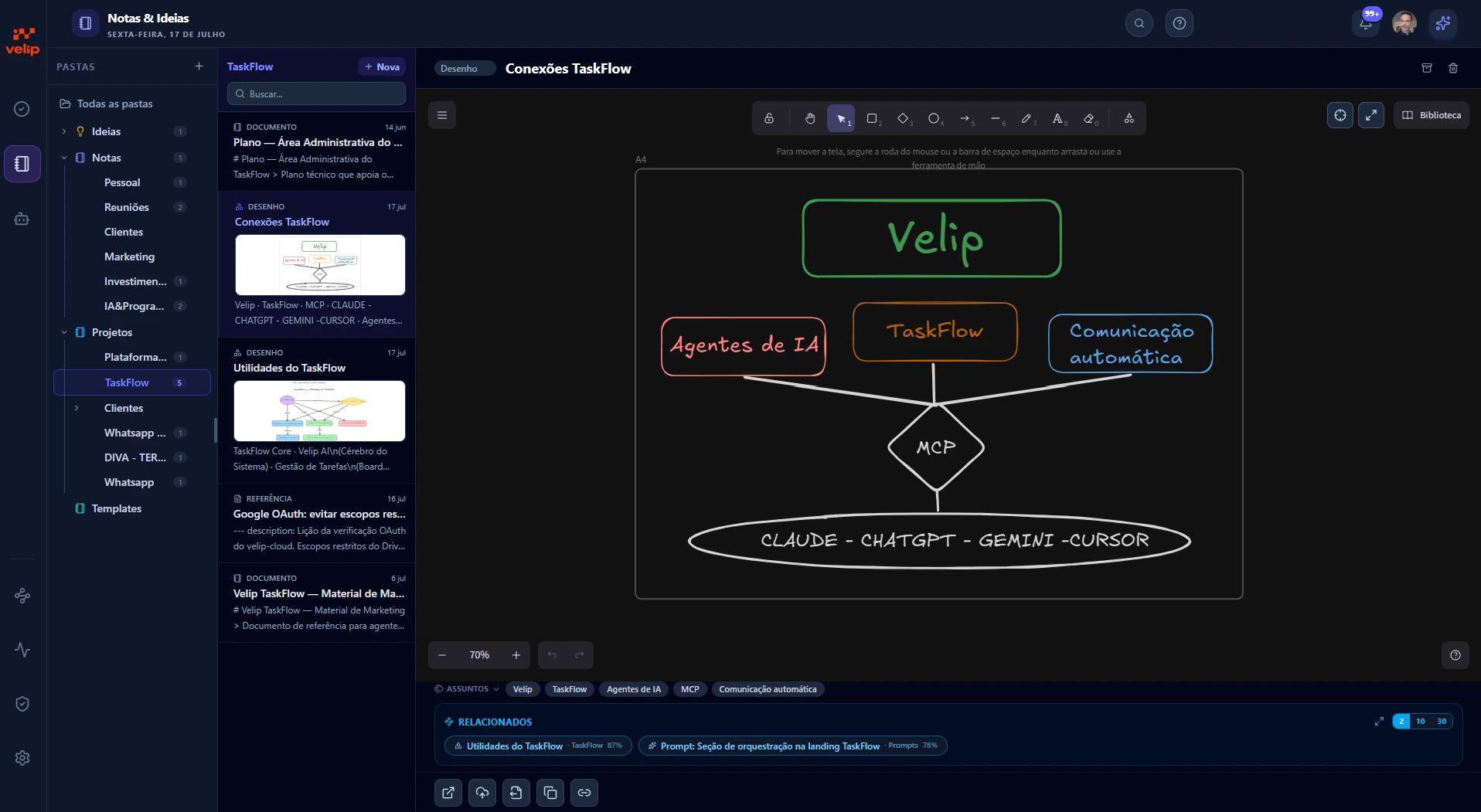
Sketch at the speed of thought. Execute at the speed of AI.
A canvas that never stands alone
Cards and tasks
Turn flowcharts into action. Link a drawn block to a card in Initiatives or Upcoming, and attach the customer journey right to the development task, giving the team instant context.
Notes and ideas
Embed the diagram in a scope document in Rich HTML. The written and the visual go side by side, without relying on Miro or Figma.
Velip AI, via MCP
The AI has structured reading of the canvas. Ask by voice or chat "draw a payment approval flowchart" and it draws the blocks in real time. Agents read the board as a process map to guide their own execution.
Free, collaborative drawing
Ultra-fast vector tech in the Excalidraw style, for wireframes, brainstorms and system architectures.
Automatic smart layout
No time to align boxes? The AI organizes and auto-lays out your block flow in one click.
Dynamic documentation
Turn the diagram into a technical spec written in Markdown or HTML in seconds.
AI changed the way you work. Rethink your workflow.
You use AI all day, but your context lives scattered: chats that vanish, loose docs, decisions in people's heads. Every conversation starts from scratch.
TaskFlow is the center of this new workflow: tasks, knowledge and memory in one safe place, that you and any authorized AI use and enrich. And the control is always yours: export everything whenever you want; switch AIs, your context comes along.
A day with TaskFlow
What you actually do with this, in practice
Three real situations for anyone coordinating work and agents at the same time.
In everyday work
The pain: the good research you did in ChatGPT disappears into the history, and the idea you had in the car never becomes a task.
Finished some research in Claude, ChatGPT or Cursor? Ask it to send it straight to your Notes: the content arrives whole, with tables, code and lists preserved. Driving? Talk by voice with an agent and dump ideas and tasks while you think. When you sit back down in front of the screen, it is all there, organized and ready to become work.
In the knowledge
The pain: your best skills and prompts stay siloed in each agent, scattered, and you never find what you need when you need it.
You store your skills and prompts in TaskFlow once. From then on, any agent connected via MCP (Claude, ChatGPT, Cursor) pulls and runs the same playbook. "Run the sales proposal skill" works the same in any AI client. No more copy-and-pasting prompts between windows; the team's knowledge lives in a central repository, versionable and shared.
In projects and code
The pain: big projects turn into a pile of steps you lose track of, and each agent works without knowing what the other already did.
You're in Claude Code and you ask: "create the task for this project and break it into subtasks." The agent creates the card in TaskFlow, generates the steps as subtasks, and you start tracking progress, or distributing each step to a different agent. Everything is recorded: what was done, by which agent, in what order. A big project stops being chaos and becomes a controlled process.
Workspaces
Separate contexts for each project or team
Personal, team, client, project. Each workspace has its own tasks, documents and memories. Agents respect these boundaries automatically: they only see what the workspace allows.
Who TaskFlow is for
To organize your own work
Freelancers, consultants, researchers and executives who want tasks, notes and memories in one place.
To preserve knowledge
Teams that need to record decisions, processes, learnings and client context.
To coordinate projects and teams
Marketing, product, operations, admin and back office: AI updates, you supervise.
To operate with AI agents
Developers and teams that use Claude, ChatGPT, Gemini, Cursor or other agents every day.
Built from a real work problem
TaskFlow was born from a real pain. As Velip's CTO, I coordinate several applications, teams and a growing number of AI agents working at the same time. No existing task tool was built for this: they organize lists for humans, they don't give agents a place to read context, run skills and record what they learned.
So we built the missing tool, first for internal use, now open to anyone who works the same way. And we built it on the foundation of a company that has already processed more than 3 billion automated interactions: Velip's infrastructure.
3 billion+
automated interactions by Velip
3 months
free to try, no card
Native MCP
Claude, ChatGPT, Cursor
You are in within 30 seconds
Sign in with Google
No card, no form. One-click login.
Organize your work
Create cards, notes and memories, or ask Velip AI to do it for you.
Connect your agent
Claude and ChatGPT join with one click of Google authorization. IDEs, via token. Optional, but it changes how you work.
Simple for you. Safe for your company.
Use it as an app, no store
Install straight from the browser, on desktop and mobile, and open it in one click.
Nothing gets lost
Auto-save every 1.2 seconds. You just think about the work.
In your team's language
Interface in Portuguese, English and Spanish.
Secure by default
Google login, protected tokens and an audit of everything the AIs do.
Deleted by mistake? Recover it
One-click backup, local or to Google Drive, and a Trash that keeps items for ~30 days.
A history of everything
A timeline of the work, with restore of what was completed.
Start free. Grow when it makes sense.
Plans per person, per month. The plan belongs to the workspace: invite your team and everyone inherits the limits.
Free
$0
3 months free, no card
- Every feature: tasks, notes, whiteboard and connection to your AIs
- 20 AI messages per day
- 20 external AI actions (MCP) per day
- 200 AI memories
Plus
$10
per person / month
- Everything in Free
- 50 AI messages per day
- 50 external AI actions (MCP) per day
- 1,000 AI memories
- Priority email support
Recommended
Top
$19
per person / month
- Everything in Plus
- 150 AI messages per day
- 150 external AI actions (MCP) per day
- 3,000 AI memories
- Dedicated account support
External AI actions (MCP) are the operations ChatGPT, Claude or Cursor run on your TaskFlow: creating tasks, reading notes, recording memories.
Billed in US dollars via Paddle. Cancel anytime: your data stays yours, with backup and export at any moment.
Frequently asked questions
What is Velip TaskFlow, in one sentence?
A web app where your tasks, notes, AI instructions and memories live in the same place, so you and agents like Claude, ChatGPT and Cursor can operate with real context.
How much does it cost?
You try it free for 3 months, no card, with everything unlocked. After that, the Plus (US$ 10) and Top (US$ 19) plans, per person per month, expand AI messages, MCP actions and memory. Cancel anytime: your data is yours, with one-click export and backup.
Why not Trello, Notion or Asana?
Those tools organize tasks and documents very well, but the context usually lives apart from the conversations and AI agents you work with. TaskFlow brings the two together: persistent memory, executable instructions, semantic search and a native connection to your agents. It is not a to-do with AI bolted on top.
What are memories and why do they matter?
Memories are durable learnings that agents record and consult across sessions and across different AI clients. They are what ends re-explaining context in every conversation.
How do I connect Claude, ChatGPT or Cursor?
Claude and ChatGPT connect via OAuth 2.0: just authorize with Google: it takes a minute, no token to copy. For IDEs like Cursor and Windsurf, generate a Bearer token in Settings. Any MCP-compatible agent works.
The product is new. Why trust it now?
TaskFlow is recent, but it runs on Velip's infrastructure, which has automated corporate communication since 2004 and has already processed more than 3 billion interactions. It is free to start, no card: you test the fit with your flow risk-free and keep full control of your data and tokens.
Is my data secure?
Yes. Firebase authentication, SHA-256 tokens, and every agent call is audited. You see everything that was done and by whom.
What do external agents have access to?
Only what the workspace allows. You control which workspaces are accessible and can revoke tokens at any time.
Does it work on mobile?
Yes. An installable PWA that runs like a native app straight from Chrome, no store.
How many people can I have in a workspace?
No technical limit. Invite by email, automatic acceptance on login.
Work with a context AI never forgets
Create your account, build up memory and let AIs work with your team's knowledge, not with conversations that vanish every time a tab closes.
Start free · Log inSign in with Google · No card · 3 months free